
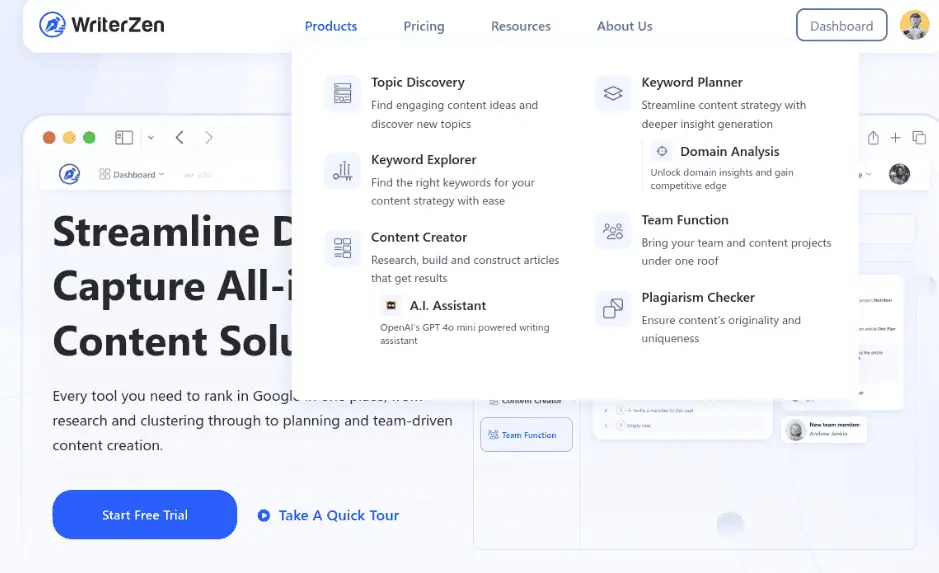
WriterZen: All-in-One Keyword Research & Content Optimization Tool
WriterZen is a great way to handle your SEO and content creation needs. 🚀It helps you find the best keywords, put together topic clusters, and create content that gets ranked on Google quicker and in a more intelligent way. With AI insights and a simple design, WriterZen changes difficult SEO tasks into a smooth creative process.
What is WriterZen?
WriterZen is like a toolbox for anyone serious about getting their website to the top of Google’s search results.It puts keyword smarts, topic ideas, and AI writing help all in one easy spot.
Basically, it helps you find keywords that pay off, plan content that gets clicks, and whip up articles that Google loves—without a ton of effort.
🚀 Key Features (Feature → Benefit → Description)
Feature
Keyword Explorer
Topic Discovery
Content Creator
Keyword Golden Ratio (KGR) Tool
Plagiarism Checker
Team Collaboration
Benefit
Find high-ranking, low-competition keywords
Generate trending content ideas
Write SEO-optimized content faster
Rank faster with easy-to-target keywords
Maintain originality and credibility
Improve workflow and consistency
Description
Find keywords that work with real search info and how hard they are to rank.
See what’s hot in your area so you can make stuff folks care about.
Get AI help to write articles that are well done, have keywords people search, and are all original work.
Find golden keywords to help you get ranked on Google super easy.
Make sure your content is unique with a built-in originality checker.
Share work, give tasks, and run your team’s writing all in one spot.
🧭 This Product is Especially Useful For:
WriterZen is awesome for bloggers, content creators, and digital marketers trying to crank out SEO-friendly stuff fast. It helps SEO folks find good keywords, check out the competition, and plan content that ranks higher on Google.
Freelancers and marketing teams can get a lot out of its AI writing help, plagiarism checks, and team features – speeding up work.
Small business owners and affiliate marketers who need to write keyword-heavy articles or product reviews to get more organic traffic and sales will also find it useful.
Free vs Paid key Features & Pricing table for WriterZen
Plan Tier
Free / Trial
Paid – Basic / Entry Level
Paid – Standard / Advanced /
Price
Free (trial period)
US $39/month for “Basic” plan (according to some sources)
US $69-$119/month (depending on plan)
Key Features
You can try basic modules like keyword research, topic discovery, and AI writing with limited credits.
Includes features such as keyword credits, plagiarism check words per day, some AI writing words/month, keyword & topic lookups.
Full suite: unlimited keyword lookup or very high limits, unlimited AI writing (in some plans), team collaboration seats, unlimited topic lookup, revenue forecasting, etc.
Get Above the Free/Trial
Lower usage limits (fewer keywords/lookups/articles), may miss some premium modules like unlimited AI writing or team features.
Much higher usage limits compared to free; access to more of the toolset; still limited compared to higher tiers.
Unlocks best value for agencies or teams, full features/limits; highest cost but greatest scope. |
How It Works (Step-by-Step Guide)
Step 1: Sign Up & Access the Dashboard
Head over to WriterZen.net and make an account. You can try the free trial to see what it can do. After logging in, you’ll see everything you need right away – Keyword Explorer, Topic Discovery, and Content Creator.
Step 2: Discover Winning Keywords
Use the Keyword Explorer to locate keywords that’ll make you money but aren’t too hard to rank for. Type in what you’re writing about, and WriterZen will show you keyword ideas, how many people search for them, how much ads cost, and how hard they are to rank for. That way, you can focus on easier stuff.
Step 3: Find Trending Topics
Then, go to the Topic Discovery section. Type in your main keyword, and WriterZen will give you related topics that are getting a lot of buzz. This helps you come up with content plans that Google will appreciate.
Step 4: Plan & Create SEO-Optimized Content
Open the Content Creator tool to start writing. WriterZen’s AI helps you organize your article with keyword suggestions, good headings, and tips to make it easy to read so your content ranks better.
Step 5: Check Originality & Optimize
Before you post, use the Plagiarism Checker to be sure your content is original. Then, look at the SEO scores, how often you use keywords, and how easy it is to read to make some last-minute improvements.
Step 6: Publish & Track Results
When your article is ready, publish it on your blog or website. You can always go back to WriterZen to tweak things, find keywords, and keep growing your audience.
🚀 Step-by-Step: How to Get Started with WriterZen
Step 1: Visit the Official Website
Just go to WriterZen.net and hit either Start Free Trial or Sign Up to make an account.
Step 2: Choose Your Plan
You can check out the free trial first to see what it’s all about. If you’re serious, go for a paid plan to get everything.
Step 3: Explore the Dashboard
Once you’re logged in, you’ll see the main tools—Keyword Explorer, Topic Discovery, Content Creator, and Plagiarism Checker— It’s all laid out clearly.
Step 4: Start Keyword Research
Use Keyword Explorer to find good keywords for what you’re writing about. This helps you plan articles and blog posts that rank well.
Step 5: Discover Content Ideas
Go to Topic Discovery to find popular and related ideas based on the keywords you picked. It’s great for organizing your content.
Step 6: Write an Article
Open Content Creator and start writing. You’ll get AI suggestions, keyword tips, and real-time help to make it SEO-friendly.
Step 7:Check & Finalize
Double-check your article with the Plagiarism Checker to make sure it’s original. Then, look at the SEO score before posting it.
Step 8: Keep Getting Better
Keep searching for the latest keywords, keep tabs on your rankings, and tweak your content plan. Use the info from WriterZen to make smart choices.
✨ My Experience with WriterZen
I started using WriterZen to make content creation and SEO easier, and it’s been a total game changer. The Keyword Explorer helped me find keywords that aren’t too competitive but still get lots of traffic, which saved me a ton of time. The Topic Discovery tool made planning articles and content clusters super easy. I could quickly see what topics were popular and relevant in my area, giving my blog a boost. The AI Content Creator was really cool. It suggested headings, subtopics, and even drafts that were well-structured and SEO-ready. Writing articles became faster and simpler without losing quality. I also liked the Plagiarism Checker—it made sure my stuff was original and professional. Overall, WriterZen boosted my productivity and my website’s traffic, making it a great tool for bloggers, marketers, and content creators.
📦 Bonus Tips for Using WriterZen
Mix Keyword Explorer with Topic Discovery
Instead of just grabbing keywords, use them to come up with content ideas. This helps you write detailed articles that rank better on Google.
Use the AI Writer Carefully
Let the AI give you ideas for headings and content, but always add your own spin. Original thoughts and examples will make your content special.
Keep an Eye on SEO Numbers
Pay attention to keyword use, how easy it is to read, and SEO scores when you write. Small changes can really help your rankings.
Use the Plagiarism Checker
Even if the AI helps you write, always check that your content is original. This makes sure people trust you and keeps you from getting in trouble for copying.
Plan Content Around What’s Hot
Use the Topic Discovery tool to stay on top of things in your area. Popular topics get more people to visit your site and keep them interested.
Watch How You’re Doing
Go back to your articles often, see how they’re doing, and make them better using new keyword ideas from WriterZen.
Work Together for Better Results
If you have a team, use the features that let you work together. Give out tasks, share drafts, and make your content process run smoothly.
❓ FAQ – Most Common Questions About WriterZen
1. What is WriterZen?
WriterZen is a tool that does a bit of everything for SEO and making content. It finds keywords, plans out your content, and lets you write articles that are good for SEO.
2. Is WriterZen free to use?
WriterZen has a free trial, but it doesn’t give you everything. If you want things like writing with AI a lot, digging deep into keywords, and working with a team, you’ll have to pay them.
3. Who is WriterZen for?
It’s great for bloggers, content writers, marketers who work online, SEO people, owners of small businesses, and affiliate marketers.
4. Will WriterZen make me rank higher on Google?
Yup! With WriterZen, you can look into keywords, group topics, and use SEO tricks to write content that has a better chance of ranking high when someone searches for it.
5. Does WriterZen write with AI?
Yep, WriterZen has an AI Content Creator that helps you quickly create structured content.
6. Can I check if my writing is copied inside WriterZen?
You sure can. WriterZen checks for plagiarism, so your stuff stays original.
7. Is it easy to learn?
Yes, it is. The layout is simple, so anyone can start looking for keywords, planning topics, and writing for SEO.
8. Can my team use WriterZen?
Yes, it can. If you go with a more upgraded plan, many people can work at the same time, share what they’re writing, and keep projects in order.
Want to improve your content and get better Google rankings? Try WriterZen for free today! See how simple it is to find keywords, plan content, and write articles that get traffic. Do it now and make your content better!