
WP Force SSL Plugin All-in-One WordPress SSL Redirect, Monitoring & Mixed Content Scanner
Want to keep your WordPress site safe and sound? Try WP Force SSL. It’s a super simple way to switch your site to HTTPS, fix those mixed content errors, and keep an eye on your SSL certificate. Best part? It’s all done with one click. No need to mess with code, and it can even help your site show up higher in search results!
What is WP Force SSL?
WP Force SSL is a WordPress plugin that makes your website secure by making sure all pages use HTTPS. It automatically sends people from HTTP to HTTPS, fixes mixed content warnings, and keeps an eye on your SSL certificate so your site stays safe and shows up in search engines. It’s easy to use for everyone, even if you don’t know much about tech.
⚙️ Key Features (Feature → Benefit → Description)
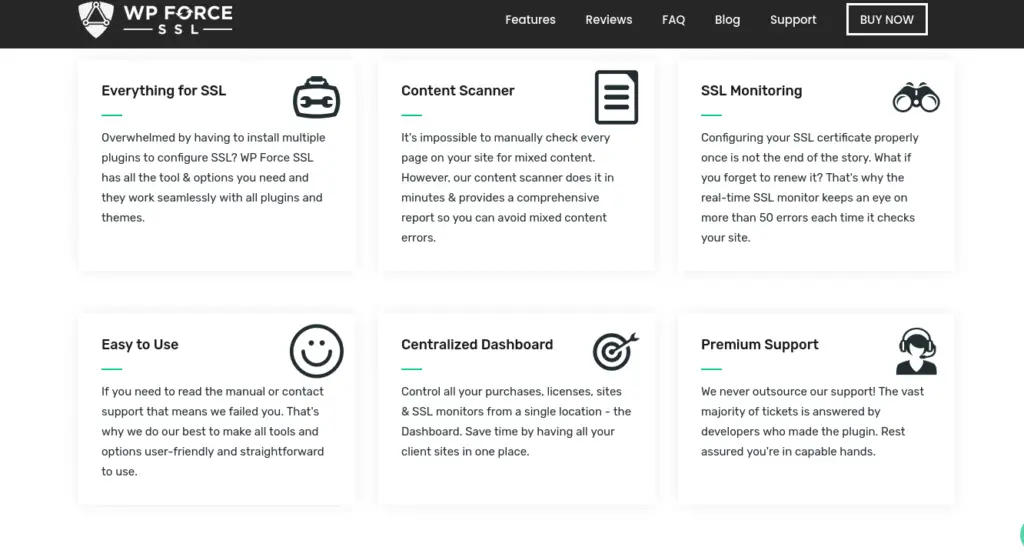
1. Easy HTTPS Redirect: Get instant security by switching all your traffic to HTTPS with one click. It encrypts stuff and keeps user data safe without you having to mess with settings.
2. Mixed Content Scanner: Fix SSL Problems Fast. It automatically finds and fixes mixed content errors like unsafe links or images that stop the green padlock from showing. Keeps your site secure and trustworthy.
3. SSL Monitoring: Always Protected. It watches your SSL certificate to be sure it’s valid and hasn’t expired. That way, your site won’t go down because of SSL problems.
4. Dashboard: Control and Info. The dashboard is clear and shows your SSL health, redirect stats, and security reports, all in one place.
5. No Code Needed: Simple for everyone. Even if you aren’t technical, you can get HTTPS , scan for issues, and handle SSL in a few clicks.
🎯 This Product is Especially Useful For:
1. WordPress Site Owners: If you’ve got a WordPress site and want HTTPS security without messing with tricky code or server stuff, this is for you.
2. Bloggers & Content Creators: Keep your readers’ data safe and build trust by showing that secure padlock on your site.
3. E-Commerce Store Owners: Protect customer info, make sure transactions are safe, and help your online store show up higher in search results.
4. Web Devs & Agencies: Easily set up and keep an eye on SSL for all your client sites from one place.
5. SEO Folks: HTTPS helps your Google ranking—WP Force SSL makes sure your site is set up for search engines.
Free vs Paid key Features & Pricing
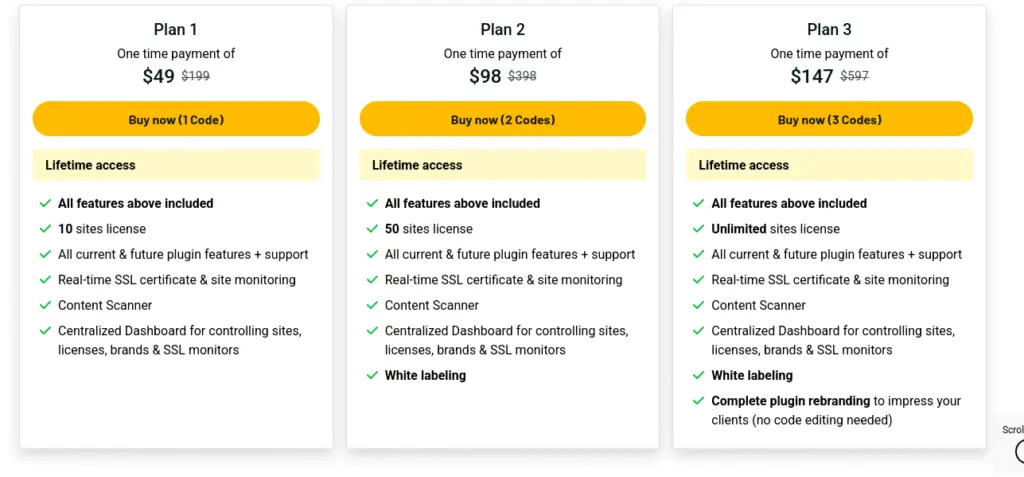
🔍 Features Comparison
Plan
Free
Key Features (Free)
• HTTP → HTTPS redirect
• Check SSL certificate validity & expiry.
• Basic security headers (e.g., HSTS, X-Frame).
• Basic admin dashboard widget & menu
Key Features (PRO)
• Mixed-content scanner & fixer
• Real-time SSL monitoring (checks >50 errors) & alerts.
• Centralized Dashboard for managing licenses, sites & monitors.
• White-label mode & rebranding (in higher tier).
🧩 How It Works
Force HTTPS Redirection:
Once you turn it on, this plugin automatically switches everyone to HTTPS. So, every page, post, and picture loads safely.
Fix Mixed Content Issues:
WP Force SSL looks around your site for any unsafe (HTTP) links and helps you fix them. This way, your site gets that secure padlock in browsers.
Monitor SSL Certificates:
It always checks your SSL certificate for mistakes, when it expires, or wrong setups and warns you before these things bother people visiting your site.
Manage Everything from One Dashboard:
If you get the PRO version, you can handle lots of sites, watch SSL health, and change all settings from a single dashboard.
🚀 How to Get Started
Step 1: Install & Activate the Plugin
Go to your WordPress Dashboard, then to Plugins, and click Add New.
Look for “WP Force SSL.”
Hit Install Now, and then click Activate.
Step 2: Enable SSL Redirection:
Go to Settings, then WP Force SSL.
Click Enable Force SSL to automatically send everyone to the HTTPS version of your site.
Step 3: Check for Mixed Content (PRO feature):
Run the Content Scanner to find and fix any links or images that aren’t secure.
Step 4: Monitor Your SSL Status:
See how your SSL is doing, when it expires, and your security score right on the dashboard.
Step 5: Enjoy a Fully Secure & SEO-Friendly Site
When HTTPS is on and you’ve fixed mixed content, your site will have that green padlock and rank higher in search results.
🧠 My Experience with WP Force SSL
I’ve tried WP Force SSL on a bunch of WordPress sites, and it’s seriously one of the easiest and most dependable SSL plugins out there. Setting it up was super fast – I mean, it took just one click to make my whole site HTTPS.The mixed content scanner did its job perfectly, finding any insecure links that I didn’t spot. And the SSL monitoring that gives updates in real-time really helped me feel relaxed because it made sure I knew when my certificates will expire.What I liked best was how easy to use the dashboard was. It’s simple, great for beginners, and has useful info like SSL status, redirect numbers, and when my certificate expires. For people who aren’t techy, this plugin makes setting up SSL easy.
Basically, WP Force SSL does what it says: quickly secures your site, keeps it secure, and helps improve trust and SEO without messing with code.
❓ FAQ – Most Common Questions About WP Force SSL
1. What’s WP Force SSL?
WP Force SSL is a WordPress plugin that makes your website secure by using HTTPS. It fixes mixed-content problems and watches your SSL certificates as they happen. This keeps your site safe, builds trust, and helps with SEO.
2. Is WP Force SSL free?
Yep! There’s a free version with basic stuff like redirecting to HTTPS, checking SSL certificates, and simple security headers. If you get the PRO version, you get extras like scanning for mixed content, watching things in real time, and a single dashboard to see everything.
3. Do I need to be a tech expert to use it?
Nope. WP Force SSL is made for beginners. Most things, like forcing HTTPS and scanning for mixed content, just take one click.
4. Will this help my SEO?
Totally! Google likes HTTPS websites, so securing your pages with SSL can give you a better ranking. Fixing mixed content makes sure you have that green padlock, which makes people trust your site more.
5. Can I use it on more than one website?
You sure can, but the PRO version is better if you’re managing several sites. The Team and Agency licenses let you keep an eye on SSL across many WordPress sites from one place.
6. How does the plugin deal with mixed content?
The plugin checks your website for HTTP links in images, scripts, and stylesheets automatically. Then, it helps you fix them, so your pages show the secure padlock without any problems.
7. Will my site crash if the SSL messes up?
No way. WP Force SSL watches your SSL certificates and tells you if they’re about to expire or have issues. That way, you can do something about it before your site becomes unsafe.
8. Can I delete the plugin later without problems?
Sure, but you should undo any HTTPS changes you made before you uninstall the plugin. If not, people might see redirect errors.
It’s easy to keep your site secure, trusted, and ranking well on search engines. This plugin handles HTTPS redirects, fixes mixed content, and watches your SSL in real-time – all with one click. So, if you’re a blogger, run a business, or work at an agency, you can easily manage SSL without getting technical.