Airbrush AI-Powered Photo Enhancer for Bloggers & Creators
Airbrush is a photo editor that uses AI to quickly turn your regular photos into great-looking images. It does smart touch-ups, smooths skin, and offers other pro-level fixes so everyone can make their photos look amazing without much effort. It’s great for selfies, portraits, and fun projects. Airbrush.ai makes editing photos easy and quick.
What is Airbrush.ai?
Airbrush is a photo editor that uses AI to help you quickly improve your photos. It lets you retouch and polish your images easily. Whether you create content, influence people, or just enjoy taking pictures, Airbrush.ai puts pro-level editing within reach of anyone – no special skills needed.
Key Features (Feature → Benefit → Description)
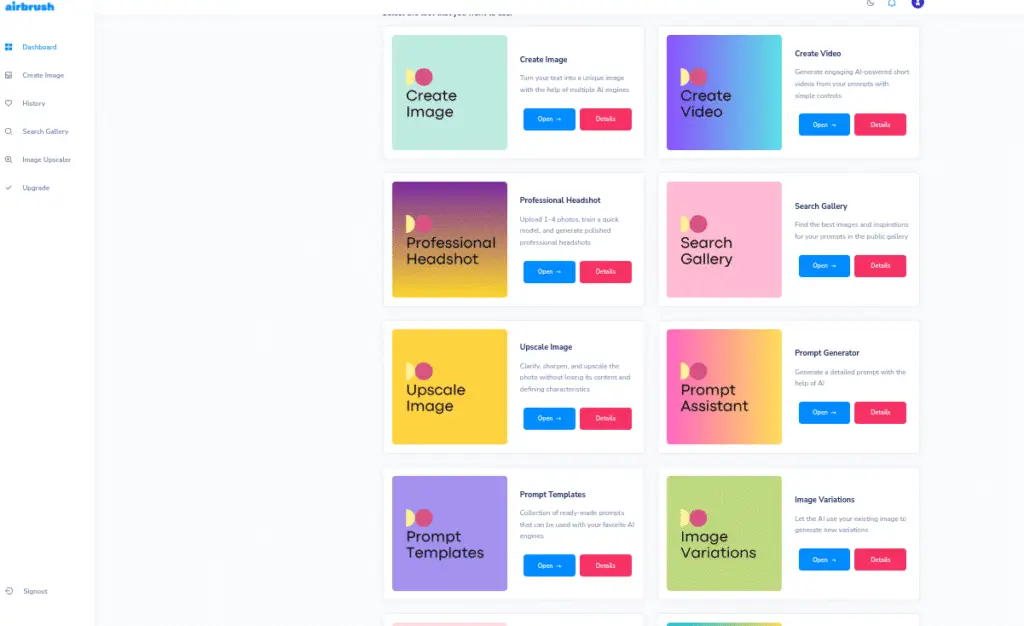
Smart Retouching → Perfect Photos → It finds flaws in your pics and makes skin smooth. It gets rid of spots and balances colors so everything looks great.
AI Skin Smoothing → Glowing Skin → Get naturally glowing skin fast without overdoing it. Great for selfies!
Photo Fixes → Pro Quality → Boost colors, lighting, and sharpness to make every photo look professionally edited.
Backgrounds → Get Creative → Easily remove, swap, or blur backgrounds so your subject stands out.
One-Click Edits → Save Time → Fix many things with just one click! Editing photos is now faster and easier.
Easy to Use → Simple for All → You don’t need special skills. It’s so easy to use that anyone can edit like a pro.
This Product is Especially Useful For:
Content Creators & Influencers: Make your social media pics, stories, and portfolios look great fast.
Photographers & Hobbyists: Quickly fix and improve your photos without struggling with complicated software.
Bloggers & Online Marketers: Get pro-looking images to grab more readers and get them interested.
Students & Professionals: Great for making presentations, portfolios, or personal projects look slick.
Selfie & Portrait Lovers: Get perfect skin and cool-looking photos right away
Free vs Paid key Features
Plan
Free Plan
Premium Plan
Price
$0/month
$9/month
Key Features
• 20 image credits/month
• Image Upscaling
• Blog‑Article Cover creator
• Image‑to‑Text converter
• Image history tracking & Public gallery access
• 500 image credits/month
• All Free Plan features (upscaling, blog cover, image‑to‑text, history, public gallery)
• Commercial‑use rights included check region/terms
Benefit
Great for casual use; test the tool, create occasional visuals without cost.
Ideal for creators/marketers who need higher volume and full rights for commercial projects.
Notes & Considerations:
Prices and credit amounts can change depending on where you are, what currency you’re using, or any special deals happening. Like, some places say the free plan gets you 20 credits, but others say it’s more.
So, it’s always a good idea to look at the official website or your account’s billing page to find the latest costs and rules.
Those image credits are a big deal because they limit how many pictures you can make each month.
Also, things like getting the rights to use the images for business stuff matter if you’re thinking about using them for work or ads.
How It Works
1.Upload Your Photo
Put your picture on Airbrush.ai. It works with JPEGs, PNGs, and most stuff people use.
2.Choose AI Features
* Smart Retouching: Get rid of zits and stuff.
* Skin Smoothing: Make your skin look great.
* Background Editing: Mess with the background—change it or blur it.
* Photo Improvement: Fix the colors, lighting, and make things sharper.
3.One-Click Edit or Customize
Make quick edits with just one click, or adjust things to get exactly what you want.
4.Download or Share
After you’re done fixing it, download your image or post it on social media.
How to Get Started
Sign Up
Head to the Airbrush.ai website and make a free or paid account.
Choose a Plan
Choose either the Free or Premium Plan, whichever fits what you need.
Put Up Your Photo
Load up pics from your computer or phone.
Edit with AI
Use AI tools such as Smart Retouching, Skin Smoothing, and Background Editing to make your photos look better.
Download and Use
Grab your edited pic. If you’re a Premium member, you can use the pics for business stuff.
My Experience with Airbrush.ai
I’ve been playing around with Airbrush.ai for a few weeks, and it’s totally changed how I edit photos. The AI tools make touching up photos super easy – spots vanish, skin looks real, and the photos look way better overall.
Here’s what I really liked:
Quick & Easy: Editing only takes a few seconds, unlike regular software.
Pro-Level Looks: My photos look great, even though I’m not a pro.
Play Around: Changing backgrounds and improving images is easy, so I can try out different vibes.
The free plan is cool if you just want to mess around a bit. But the paid plan is great if you need to create a bunch of nice images for social media, blogs, or work. Basically, Airbrush.ai gives you great results without being hard to learn like other photo editors.
FAQ – Most Common Questions About Airbrush.ai
1. What’s Airbrush.ai?
Airbrush.ai is a photo editor that uses AI to help you fix, improve, and perfect your photos without any trouble. It works great for selfies, portraits, and fun creative stuff.
2. Does Airbrush.ai cost anything?
Yep, Airbrush.ai has a free option that comes with a few image credits and basic editing stuff. If you want more stuff and better features, there’s a paid plan.
3. Can I use Airbrush.ai for my business?
If you have the paid plan, then yes. If you’re on the free plan, it’s mostly for personal use.
4. What kind of pictures can I upload?
Airbrush.ai takes JPEGs and PNGs. If you want the best results, use high-quality images.
5. Do I need to be a photo editing expert to use it?
Nope. Airbrush.ai is made for everyone. The AI tools make editing super easy.
6. How many pictures can I edit each month?
That depends on what version you have. People using the free version get about 20 image credits each month, but if you pay, you can get around 500.
7. Can I change the backgrounds in Airbrush.ai?
For sure. Switching out, getting rid of, or blurring backgrounds is easy with the background editing feature.
8. How fast does it work?
Most edits happen in seconds thanks to AI. It’s way quicker than regular photo editing software.
9. Can I get Airbrush.ai on my phone?
Right now, Airbrush.ai is a website, so you can get to it on your computer or phone.
Airbrush is an AI photo editor that’s simple enough for beginners but still packs enough punch for pros. It’s got smart tools, works fast, and is easy to use, so it’s great if you want to fix up your photos fast and make them look good. The free version is a nice way to get started, but the paid version really lets you do some cool stuff if you’re serious about editing.