
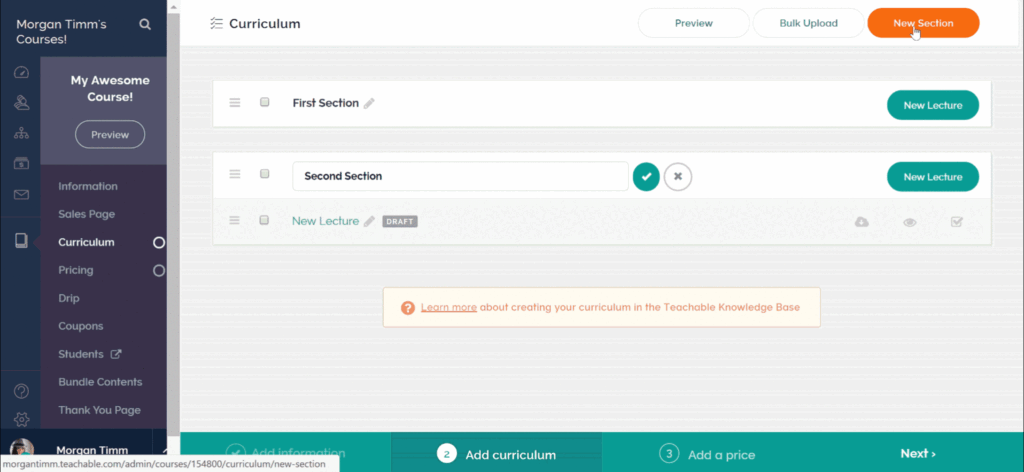
If you want to create and sell online courses, Teachable is a really good platform that a lot of people trust. It was made to make online education easier, and it lets creators, entrepreneurs, and teachers easily make, market, and sell their courses all in one place.
What is Teachable?

Main Features of Teachable
Making Courses Simple:
Teachable has a simple drag-and-drop course builder with templates you can change. It’s easy to add videos, quizzes, PDFs, and more to create great courses.
Managing Students:
Keep tabs on who’s signing up, how they’re doing, and if they’re really involved. You can chat with students through email and control who gets into the course without any trouble.
Getting Paid:
Get paid in different ways, like single payments or subscriptions, from anywhere in the world. Teachable works with payment systems like PayPal and Stripe and takes payments in many currencies.
Marketing:
Get the word out about your courses with marketing things like coupons, affiliate programs, email blasts, and pages that get people to sign up.
Stats:
Watch how your course is doing with stats that show sales, how students are doing, and how involved they are. This info helps you make your courses even better.
Your Own Brand:
Give your school your own look with your logo, colors, and domain name.
Safe and Sound:
Teachable deals with hosting, security, and updates, so you can just focus on making stuff without worrying about tech headaches.
How Teachable Works
The platform Teachable offers users an easy learning experience for beginners. The following guide explains Teachable operations through a sequence of steps.
Sign Up & Create Your School
Users need to create a Teachable account to establish their online school platform. Users can personalize their school name together with branding elements and domain selection.
Build Your Courses
The Teachable drag-and-drop builder enables users to construct their courses. The course becomes more engaging through the combination of video content with PDF materials and quiz elements and assignment tasks.
Set Pricing & Monetize
Students can pay for courses through Teachable’s payment system which supports single payments and subscription-based models and customized payment plans. The platform maintains secure payment processing for all transactions.
Launch & Promote Your Course
The platform enables users to distribute their courses while using Teachable & Track Progress
The platform enables users to monitor student enrollment statistics and track their learning progression and active’s promotional tools which include coupon generation and affiliate recruitment and email marketing and landing page creation.
Manage Students participation. The system enables automated email delivery and certificate issuance and delivers an optimized learning environment.
The platform enables users to track their course performance through analytics which show sales data and student feedback. The system enables users to enhance their course content for improved performance throughout time.
My Experience Using Teachable
I faced multiple software complications and hosting problems and payment system issues when I began making online courses. Teachable became my solution after discovering the platform which transformed my entire work process.
The platform offered me an extremely simple user interface from my first day of use. The platform allowed me to add videos and PDFs and quizzes to my courses through drag-and-drop functionality without needing any programming skills. The payment process became simple because students from everywhere in the world could join my courses while I received secure payments through PayPal and Stripe.
The platform offered tools which transformed my marketing operations. The platform provided me with three essential marketing features which made course promotion simple: coupons and email campaigns and affiliate programs. The analytics tool provided me with student progress data and sales information which I used to enhance my courses.
Teachable enables users to create and distribute online courses through a straightforward process which produces professional results and generates financial success. Teachable stands as my top recommendation for anyone who wants to teach others through online courses.

It’s time to level up your business with the deal of the year
Benefits of Using Teachable
Easy to Use
Teachable is super simple. Beginners can make pro-looking courses with no coding skills needed.
Everything You Need in One Place
Make courses, handle students, get payments, and do marketing, all on one site.
Payment Options That Work for You
With Teachable, you can charge a single fee, set up subscriptions, or use payment plans. Plus, you can give out coupons and discounts.
Marketing Tools Included
Built-in tools like affiliate programs and email stuff help you get the word out about your courses.
Safe and Sound
Teachable takes care of hosting, security, and payments, so you don’t have to worry.
Stats That Help
Keep an eye on sales, how students are doing, and how involved they are. This will help you make your courses even better.
Cons of Using Teachable
Basic Plan Fees
Teachable charges a fee for each sale if you’re on a cheaper plan.
Limited Customization
You can tweak things, but fancier branding options require a pricier plan.
No Community Feature
Teachable doesn’t have a forum like some platforms do.
Stuck with the Platform
Your courses live on Teachable, so you’re depending on their setup and rules.
FAQ
1. What’s Teachable?
Teachable is a site that lets you build, run, and sell online courses without a lot of fuss. It’s great if you’re a teacher, business owner, or like making stuff for the internet.
2. What’s the damage for Teachable?
Teachable has a few different price options. They have a basic one with fees on each sale, and then pricier ones, like Professional and Business, with extra stuff and no fees.
3. Can I use my own website with Teachable?
Yep, you can use your own domain name to make your school look all fancy.
4. Does Teachable have stuff to help me advertise?
Yeah, it has things like coupons, ways for people to promote for you, email stuff, and pages to get people interested in your courses.
5. Is Teachable safe when it comes to payments?
Definitely. Teachable uses PayPal and Stripe to handle payments safely, and it keeps your students safe with SSL.
6. Can I see how students are doing?
Yes, Teachable gives you the lowdown on who’s signed up, who’s finished, and how involved everyone is.
7. Is Teachable good for people who are just starting out?
Yes it is. Teachable is easy to use. You can drag and drop to make courses, and the whole thing is pretty simple to figure out.